

About
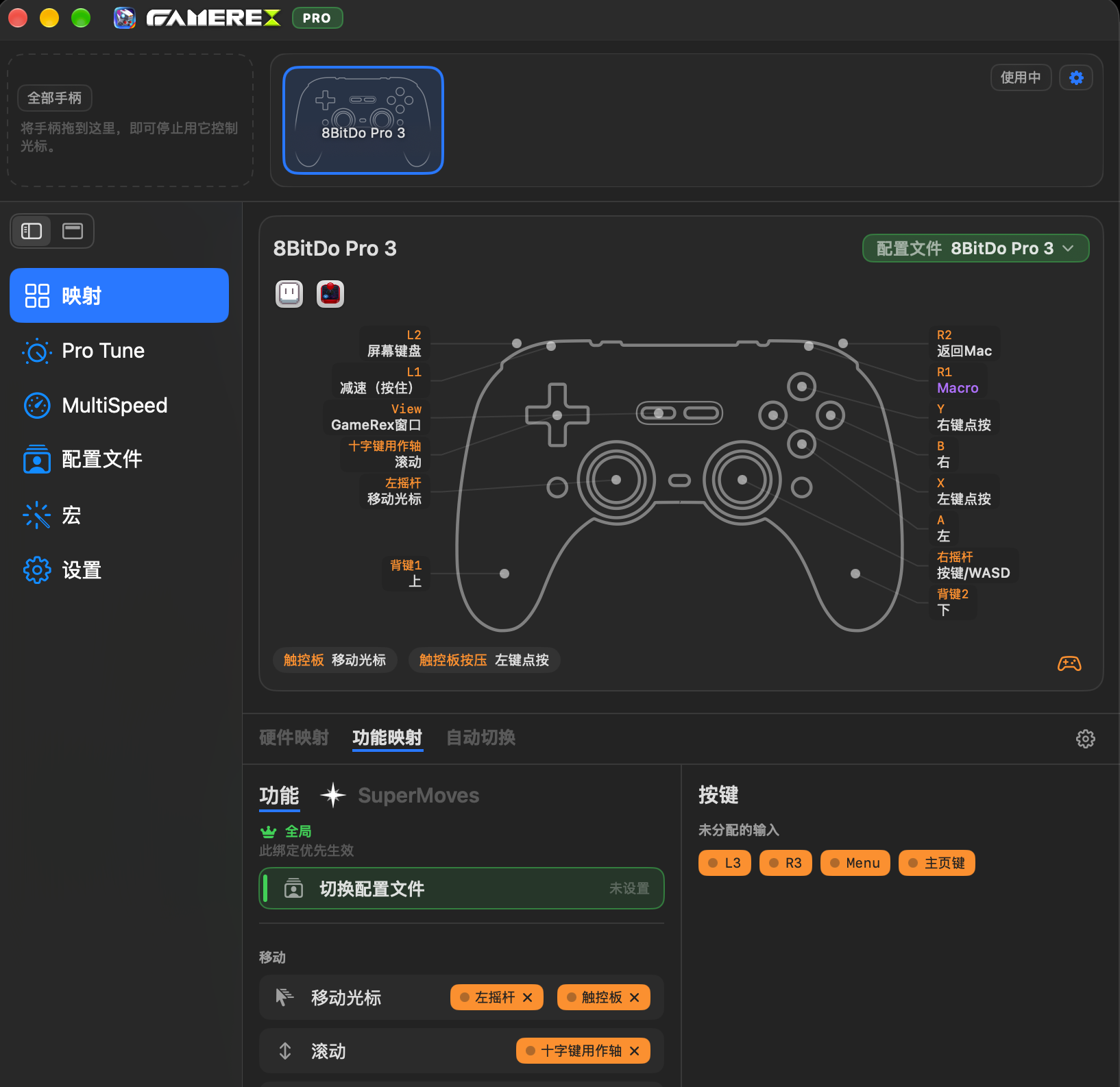
When we play games on a Mac connected to the TV, even switching windows or typing a few letters means putting down the controller and reaching for a mouse or keyboard. We built GameRex so we could do those things from the couch with the controller already in our hands.
Use the sticks to move the pointer, and use your controller to click, drag, scroll, and type with an on-screen keyboard. Switch pointer speeds on the fly to cross a big screen quickly or slow down to click a small button.
You can assign keyboard shortcuts to controller buttons or turn several steps into a macro you can run with one press. If you use different mappings for different apps, GameRex Pro can switch profiles automatically as you move between them.
GameRex runs on macOS 14 Sonoma or later on Apple silicon and Intel Macs. The free version includes pointer control, button remapping, the on-screen keyboard, and two macros. Pro is a one-time purchase with no subscription.
Similar & Alternative Tools
Explore popular tools in the same category upvoted by the community.

Featured Partners
AD
Real-time captions and voice input for every conversation. AI-powered transcription and translation across 50+ languages.

Catch every website question,and follow up after the chat

The admin panel you use after AI built the app

Build a Profitable Launch Site in Minutes
Be seen on every page. Only 4 spots left